
.NET FRAMEWORK 3.5 SP1 and Version 4.6.2 or higher
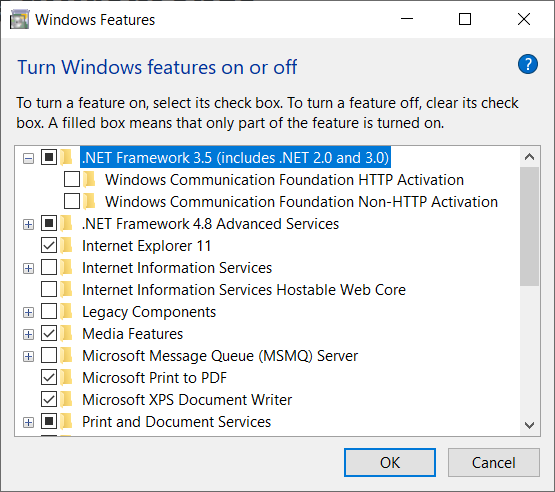
On windows 10 and 11 , on the search field on the taskbar, type in “WINDOWS FEATURES”
select Turn Windows Features off and on from the control panel
from the features dialog make sure .NET Framework 3.5 is enabled and .NET Framework 4.8
SQL Server Compact Edition 4.0 SP1
open file explorer and go to your JW-AMS1 server shared folder \\192.168.168.14\AMSNET\
double click the file SQL SERVER Compact 4.0 SP1 to install
you may be required to enter the administrator username and password to install
SQL Server Client
open file explorer and go to your JW-AMS1 server shared folder \\192.168.168.14\AMSNET\
double click the file sqlncli64.msi
you may be required to enter the administrator username and password to install
SQL server Report Viewer
open file explorer and go to your JW-AMS1 server shared folder \\192.168.168.14\AMSNET\
double click the file ReportViewer.msi to install the SQL Server Report Viewer.
Follow the prompts on the installer to complete the installation
Crystal reports 2013 runtime
open file explorer and go to your JW-AMS1 server shared folder \\192.168.168.14\AMSNET\
double click the file CRRuntime_32bit_13_0_7 to install
click next on all the questions
Reflection 14 and service pack
open file explorer and go to your JW-FILE server shared folder \\jw-file\Shared\
in that folder is a folder labeled apps , then folder AMSNET, then folder Reflection 14
double click the file rhpnsvt-14.1.0-prod-w32 to install first
do a workstation installation
then double click file reflect-14.1.5-sp-w32 to install the service pack
AMSNET
open file explorer and go to your JW-FILE server shared folder \\jw-file\Shared\
in that folder is a folder labeled apps , then folder AMSNET, then folder x86 , then folder 462
double click the file setup.exe to install AMSNET or you can use the link
\\jw-file\Shared\apps\x86\462\setup.exe
after installation enter the username and password for the user that will be using AMS. Users and password are setup in AMS by an administrator